

Why Website Speed Is Killing Your SEO (And How to Fix It)

If your small business website loads slowly, you are losing customers before they ever read a single word. For business owners across Tampa, Long Island, Florida, and beyond, a sluggish site is not just a frustrating experience — it is a measurable drain on your search rankings, leads, and revenue.

Website speed optimization is one of the most overlooked priorities in small business web design. The good news? The fixes are real, the results are trackable, and you do not have to figure it out alone. This guide breaks down exactly why page load time matters for SEO, what Google's Core Web Vitals mean for your business, and the steps you can take to compete at the top of search results.
Key Takeaways
A one-second delay in page load time can reduce your conversions by up to 7%.
Google uses Core Web Vitals (LCP, INP, CLS) as direct ranking signals in search results.
Over 53% of mobile visitors abandon a website that takes longer than three seconds to load.
Slow websites drive up bounce rates, which signals poor content quality to Google's algorithm.
Simple fixes like image compression, caching, and better hosting can dramatically improve performance.
A faster website directly supports both your SEO strategy and your bottom line.
Table of Contents
What Is Website Speed Optimization?
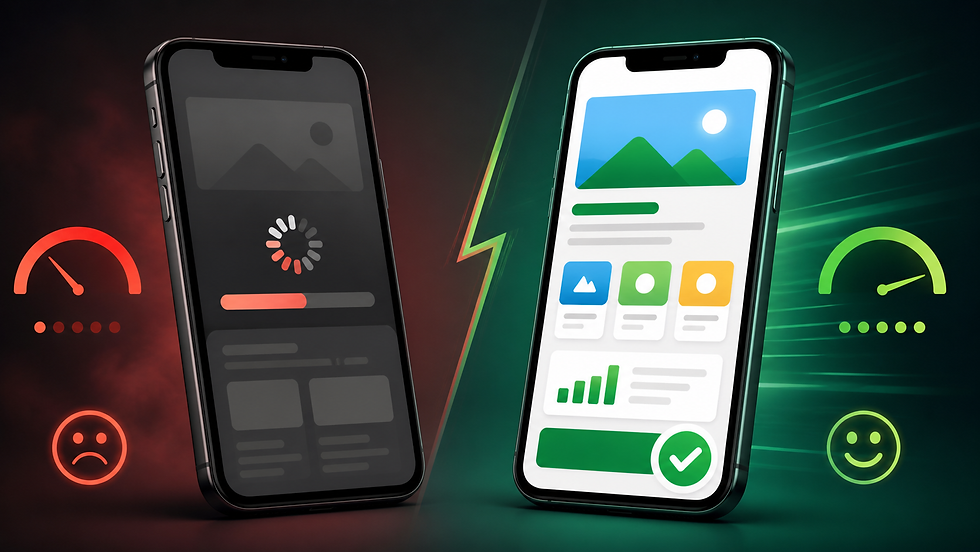
Website speed optimization is the process of improving how quickly your website loads for visitors and search engines. A fast-loading site reduces the time between a user clicking your link and being able to read, interact with, and convert on your content.
Speed is measured through several technical benchmarks, including time to first byte (TTFB), total page load time, and Core Web Vitals. For most small businesses, the goal is to achieve a fully loaded page in under three seconds on both desktop and mobile.
At Slaterock Automation, every website we build is designed with performance in mind from day one. We do not just build good-looking sites — we build sites that load fast, rank well, and convert visitors into paying customers.
How Page Speed Directly Affects Your SEO Rankings
Page speed is a confirmed Google ranking factor and has been since 2010. Today, its influence has grown significantly through the formalization of Core Web Vitals as part of Google's page experience ranking signal.
When your website loads slowly, it does not just frustrate visitors. It sends negative signals to Google in two important ways. First, there is the direct channel: Google's algorithm evaluates your Core Web Vitals data and factors it into your search rankings. Second, there is the indirect channel: slow sites produce higher bounce rates and shorter dwell times, which signal to Google that your content is not providing a quality experience.
According to Google's research cited by Hostinger, bounce rates increase by 32% when load times reach three seconds. When load time increases from one second to five seconds, bounce rates jump by 90%. Both of these behaviors are tracked and factored into how Google ranks your pages over time.
The result is a compounding disadvantage. A slow site ranks lower, gets less traffic, and converts fewer of the visitors it does receive — all at the same time.
Core Web Vitals Explained for Small Business Owners
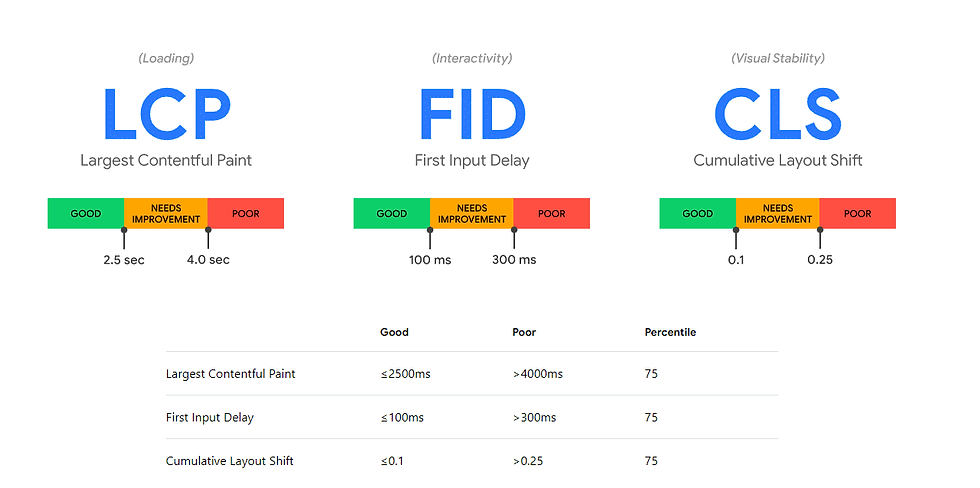
Core Web Vitals are three specific performance metrics Google uses to measure real-world user experience. They are the clearest signal that speed is no longer just a technical concern — it is a business requirement.
Here is what each metric means and what score you need to rank competitively:
Core Web Vital | What It Measures | Target Score |
Largest Contentful Paint (LCP) | How quickly the main content loads | Under 2.5 seconds |
Interaction to Next Paint (INP) | How fast the page responds to user input | Under 200 milliseconds |
Cumulative Layout Shift (CLS) | How stable the layout is while loading | Below 0.1 |
Google evaluates these metrics using real user data from the Chrome User Experience Report (CrUX). If at least 75% of your visitors experience "good" scores across all three metrics, your site passes the page experience signal.
Failing any of these thresholds means you are ceding rankings to faster competitors, even when your content is strong. For small businesses competing in local markets like Tampa or across Florida, this distinction can directly determine whether you appear on page one or page three.
How Slow Websites Hurt Conversions and Revenue
A slow website does not just hurt your rankings — it directly costs you leads and sales every single day. According to data compiled by Hostinger, websites that load in one second see conversion rates as high as 40%, but that number drops to 29% by the third second.
That is not a small drop. For a local service business generating 1,000 monthly visitors, that difference could represent dozens of missed leads every month.
The financial stakes become even clearer when you look at specific delays:
A one-second delay can reduce conversions by up to 7%.
A three-second wait reduces customer satisfaction by approximately 16%.
Around 73% of users say they would switch to a competing site if the current one loads too slowly.
Is your website costing you leads every day? Schedule a free site audit with Slaterock Automation and find out exactly what is slowing you down.
For mobile users, the situation is even more critical. About 70% of mobile users have encountered a website that was too slow to load, and nearly 62% say they are less likely to buy again after that bad experience. Since the majority of your customers are likely visiting on a phone, mobile speed is not optional — it is essential.
The Most Common Reasons Your Website Is Slow
Understanding the problem is the first step toward fixing it. Most slow websites share the same handful of issues, and they are more fixable than most business owners realize.
Unoptimized Images Images are the single largest contributor to page weight. Over three-quarters of a webpage's total size comes from images, according to Hostinger's speed research. Large, uncompressed images loaded without modern formats like WebP or AVIF significantly increase load time.
Bloated Code and Excess Scripts Websites built with too many plugins, third-party tracking scripts, or heavy CSS and JavaScript frameworks take longer to process before the page becomes usable. Every script that loads before your content delays what the visitor actually sees.
Slow or Shared Hosting Low-quality hosting creates a bottleneck that no amount of front-end optimization can fully overcome. Shared hosting environments distribute server resources across many sites, which can lead to slow time-to-first-byte (TTFB) when traffic spikes.
No Caching Strategy Without caching, your server rebuilds every page from scratch on every visit. A proper caching setup stores pre-built versions of your pages and serves them almost instantly to returning visitors.
No Content Delivery Network (CDN) If your server is located in one region and your customers are spread across the country, content has to travel farther to reach them. A CDN stores copies of your site's assets on servers around the world, dramatically reducing delivery time. According to Cloudflare, CDN deployment can reduce TTFB by 60 to 80%.
How to Improve Website Speed: A Practical Checklist
Improving website speed does not require starting from scratch. Most businesses can see significant gains through targeted optimizations applied to an existing site.
Optimization | Impact Level | Difficulty |
Compress and convert images to WebP/AVIF | High | Low |
Enable browser caching | High | Low |
Minify CSS, JavaScript, and HTML | Medium | Low-Medium |
Use a CDN | High | Medium |
Upgrade to quality hosting (VPS or cloud) | High | Medium |
Defer non-critical JavaScript | Medium | Medium |
Remove unused plugins and scripts | Medium | Low |
Enable lazy loading for images | Medium | Low |
Audit and fix Core Web Vitals via Google Search Console | High | Medium |
Tools like Google PageSpeed Insights and Google Search Console's Core Web Vitals report let you see exactly where your site stands and which issues have the greatest impact on your rankings and user experience.
For businesses on Wix, Slaterock Automation builds every site with these performance principles built in. Our web design services include speed-optimized structure, image handling, and proper technical setup from the start — so you are not playing catch-up after launch.
If your current site already exists and needs a performance overhaul, our technical SEO audit service identifies exactly where speed issues are costing you rankings and leads, with a clear roadmap to fix them.
FAQs About Website Speed and SEO
Does website speed affect Google rankings?
Yes. Google uses page speed as a direct ranking signal through Core Web Vitals (LCP, INP, CLS). Slow sites consistently rank lower than fast competitors, especially in mobile search results.
How fast should my website load?
Your website should load in under three seconds. The industry benchmark is two seconds or less. Nearly 47% of users expect a page to load within two seconds, and 40% leave if it takes longer than three seconds.
What are Core Web Vitals?
Core Web Vitals are three Google metrics: Largest Contentful Paint (LCP), Interaction to Next Paint (INP), and Cumulative Layout Shift (CLS). They measure loading speed, responsiveness, and layout stability.
How do I check my website speed?
Use Google PageSpeed Insights (free) or GTmetrix to analyze your current performance. Google Search Console also shows real-user Core Web Vitals data for your site.
Can a slow website hurt my conversion rate?
Yes. A one-second delay in load time can reduce conversions by up to 7%. Sites loading in one second convert at nearly 40%, while sites taking three seconds see that rate drop to around 29%.
Ready to Speed Up Your Website?
A slow website is not just a technical problem — it is a business problem. Every second of delay is a lead that bounced, a sale that did not happen, and a ranking you lost to a faster competitor.
At Slaterock Automation, we specialize in building and optimizing Wix websites that are fast, functional, and built to rank. Whether you need a new site designed for performance from day one or an audit and optimization of your current site, our team is ready to help.
We serve small businesses across Tampa, FL, Long Island, NY, and throughout the United States. If you are ready to stop losing leads to a slow website, let us help you fix it.
Book a free strategy meeting today or use our free website SEO audit tool to get an instant snapshot of your site's performance.
References
Hostinger: Website Load Time Statistics for 2026 — Data on bounce rates, conversion rates, and load time benchmarks
Cloudflare: Why Site Speed Matters — Technical explanation of site performance factors and CDN impact on TTFB
Google via SEOmator: How Page Load Speed Impacts SEO Rankings — Research on Core Web Vitals, mobile abandonment rates, and conversion impact


500x500.png)


